

What you can model
Use models anywhere reusable data logic should stay consistent:- Transformations: Clean, join, rename, and reshape raw tables into analysis-ready datasets
- Measures: Define aggregate expressions such as revenue, active users, conversion rate, or retention
- Segments: Define reusable predicates such as active customers, paid accounts, or completed orders
- Dimensions: Document model columns and choose a default time column for time-based analysis
- Shared business logic: Give every person and AI workflow the same source of truth
models schema.
Create a model with AI
- Open Models from the main navigation.
- Describe the dataset or metric you want to model.
- Submit the prompt and review the model Basedash creates.
- Run the SQL to preview its rows, then refine any details, columns, measures, or segments.
Model editor
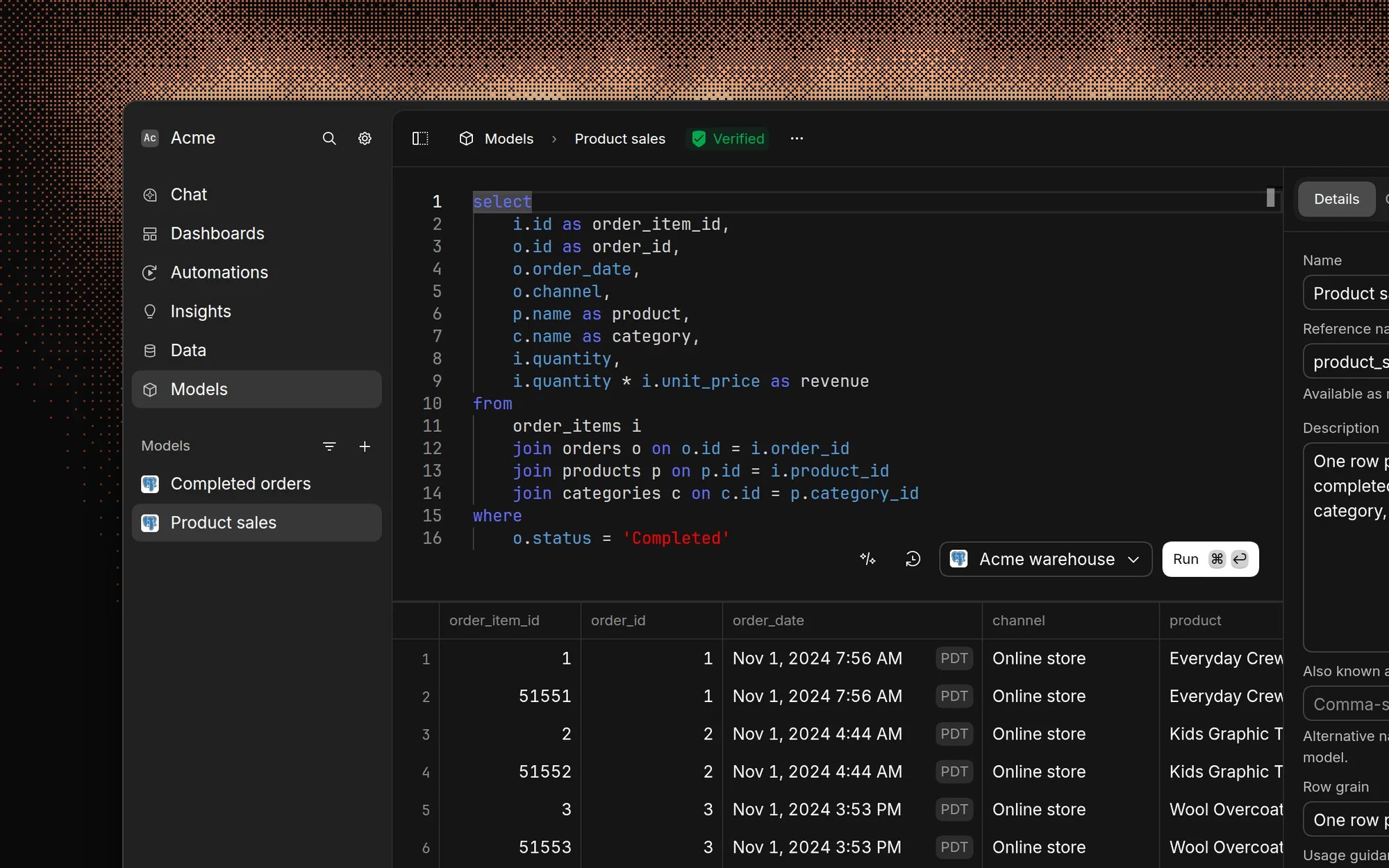
- Details: Set the model name, SQL reference name, description, data source, and verification status
- Columns: Document inferred output columns and select a default date column
- Measures: Add named aggregate SQL expressions, such as
SUM(monthly_amount) - Segments: Add named SQL predicates, such as
status = 'active'
Choose the right grain
Prefer model SQL that returns reusable row-grain data. Put aggregate calculations in measures and reusable filters in segments so the AI can group, filter, and drill into the model for different questions. For example, a subscriptions model can return one row per subscription while defining:- A
monthly_recurring_revenuemeasure withSUM(monthly_amount) - An
active_subscriptionssegment withstatus = 'active' started_atas its default time column
Query a model
Query models with normal SQL usingmodels.<reference_name>:
How AI uses models
Basedash gives its AI agents the models available for each data source, including their dimensions, measures, segments, default time columns, descriptions, and verification status. The AI can:- Create or update a complete model from a plain-language request
- Query models when answering questions or building visualizations
- Reuse measure expressions in
SELECTand segment expressions inWHERE - Prefer verified models when multiple models could answer a question
- Inspect model SQL and metadata before editing or using it
Verification and version history
Every change to model SQL or semantic metadata creates a new version. Open History to review earlier versions and restore one when needed. Organization admins can mark a model as verified. Verification tells people and AI agents which models are approved, while unverified models remain usable. Changing SQL, columns, measures, segments, or the default time column removes verification until an admin reviews the new version.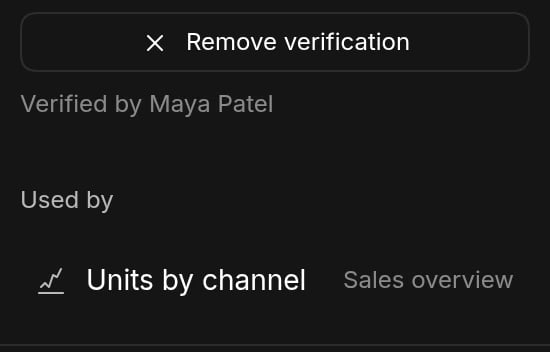
Permissions
Members can view and edit models for data sources they can access. Existing row-level and object-level data access rules also filter the model SQL and semantic metadata they can use. Only organization admins can change verification. Before changing or deleting a model, review its Used by list to see dependent models, charts, variables, and automations.Best practices
- Keep model output at the most reusable grain.
- Put aggregates in measures and reusable predicates in segments.
- Use stable reference names because queries address models through them.
- Describe the business meaning of models, columns, measures, and segments.
- Set a default time column when a model supports time-based analysis.
- Verify models that represent approved business logic.
- Keep each model within one data source and its native SQL dialect.
FAQ
Can a model combine tables from more than one data source?
Can a model combine tables from more than one data source?
No. Each model belongs to one data source and can only reference tables and
models on that source. To model data from several SaaS tools together, sync
them into Basedash Warehouse
so they share one source. A multi-source
chart can still use a model in one of its
queries.
Does a model create a table or view in my database?
Does a model create a table or view in my database?
No. When a query references
models.<reference_name>, Basedash inlines the
model’s latest SQL as a subquery, so nothing is written to your database.
If a model is slow and your data is in Basedash Warehouse, you can store its
results as a table with a materialized
model.What happens to charts when I change or delete a model?
What happens to charts when I change or delete a model?
Charts always use the model’s latest version, so they pick up SQL changes
the next time they run. Removing or renaming a column a chart relies on
breaks that chart. Deleting a model breaks every query that references it,
so Basedash asks you to type the model’s name to confirm. Check the Used
by list first.
Can Basedash import my dbt models?
Can Basedash import my dbt models?
No, Basedash doesn’t read dbt project files. Connect the warehouse where dbt
builds your tables and query them directly. Column descriptions that dbt
persists to Postgres, BigQuery, or Snowflake are synced as AI
context. Many teams build Basedash models on top of
their dbt marts to add measures and segments.
Can view-only members create or edit models?
Can view-only members create or edit models?
No. Admins and members can create and edit models for data sources they can
access. View-only members can’t change models, and only admins can verify
them.